How Are Total Calories Calculated on Apple Watch?
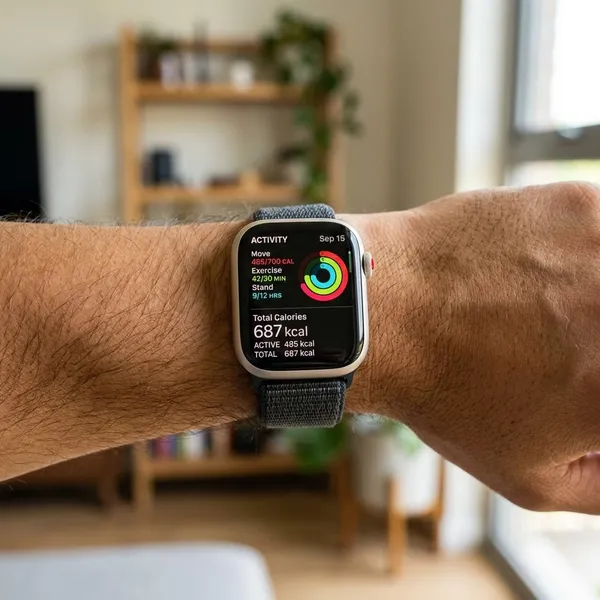
Total Calories on Apple Watch means your estimated full-day calorie burn, not just what you burned during a workout. It combines your resting calories with the extra calories from walking, exercise, errands, and general movement, so it will almost always look higher than Active Calories or Move calories.
What Total Calories Means on Apple Watch
The easiest way to read Total Calories is as your "whole day" number. If you are trying to understand how much energy your body used from morning to night, this is the Apple Watch calorie figure that includes the most.
Resting calories are included
Resting calories are the calories your body burns before you count any workout at all. Breathing, circulation, body temperature, digestion, and basic organ function all require energy, even if you spend most of the day at a desk.
This is the part many people miss. A quiet day can still show a fairly large calorie total because Apple Watch is adding your estimated baseline burn, not only your steps or exercise minutes.
Active calories are included
Active calories are the extra calories you burn above that resting baseline. They come from movement such as walking, climbing stairs, cleaning, carrying groceries, and recorded workouts.
- Light day: a few short walks and normal chores may add a modest active burn.
- Workout day: a run, gym session, or long hike can push the active part much higher.
- Busy non-workout day: errands, commuting, and standing work can still add up.
Total Calories combine both
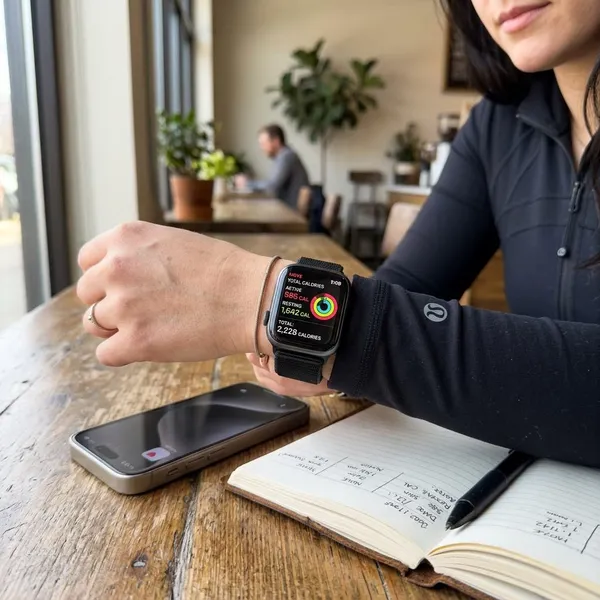
Total Calories = resting calories + active calories. If your resting burn is estimated at 1,700 calories and your active burn is 450 calories, your Total Calories would be around 2,150 calories for that day.
Use that number when you want the big-picture view. If you only want to judge how much your workout added, Total Calories is too broad on its own.

How Apple Watch Calculates Total Calories
Apple Watch estimates calories by combining your Health profile with sensor data from the watch. It is not measuring calories directly like a lab test would, so the quality of the estimate depends on the information and signals it receives.
Personal health data
Your age, sex, height, and weight help Apple Watch estimate both resting calorie burn and activity-related burn. If your weight has changed noticeably or your profile was entered incorrectly, calorie estimates can drift.
The first check is simple: open your Health details and make sure they still match your current body. This matters most if you are using Total Calories for weight loss, maintenance, or nutrition planning rather than casual activity tracking.
Heart rate
Heart rate gives Apple Watch a clue about effort. A slow walk on flat ground and a fast uphill walk may involve similar movement patterns, but your body is working differently, and the watch can use heart rate to refine the estimate.
When heart rate readings are patchy, workout calorie estimates may become less reliable. That is why fit and placement matter more during running, cycling, HIIT, or any session where your wrist moves a lot.
Movement and workouts
The watch also looks at motion: steps, arm movement, pace changes, and workout type. Starting the correct workout helps because Apple Watch can apply a more relevant activity model instead of treating all movement the same.
A common mistake is choosing a convenient but wrong workout type. Logging indoor cycling as an outdoor walk, for example, gives the watch the wrong context and can make the calorie estimate less useful.
Daily activity
Total Calories keep building outside formal workouts. A day spent shopping, doing housework, walking between meetings, or looking after kids may burn more than a "rest day" that is mostly sitting.
For someone who only wears the watch at the gym, the daily picture will be weaker. For someone who wears it most of the day, the trend usually becomes more useful because the watch sees both exercise and ordinary movement.
How Accurate Are Apple Watch Total Calories?
Apple Watch Total Calories are best treated as an estimate for trends, not a perfect calorie receipt. The number can be useful, but it should not be treated as exact enough to justify eating back every calorie without watching your longer-term results.
Accurate personal data improves estimates
If your profile is wrong, the estimate starts from the wrong place. Check your weight, height, age, and sex before worrying about more complicated explanations.
This is especially important after weight change. A profile that is 20 pounds out of date can affect both resting and active calorie estimates more than a small daily movement difference.
Proper watch fit improves tracking
The watch should sit snugly enough that the back sensor keeps steady contact with your skin, especially during workouts. It should not slide around your wrist, but it also should not feel painfully tight.
- Wear it just above the wrist bone.
- Tighten it slightly for exercise if needed.
- Keep the sensor area clean.
- Watch for poor readings if tattoos, lotion, or loose fit interfere.
Correct workouts improve estimates
Choosing the right workout type gives Apple Watch better context. A strength session, outdoor run, indoor cycle, and casual walk do not create the same signals, so the selected workout matters.
If you forget to start a workout once, do not panic over that single day. If you regularly log the wrong activity, your trends become harder to trust.
Consistent wear improves trends
One day's Total Calories can be noisy. A few weeks of consistent wear usually tells you more, because you can compare similar days and spot patterns.
For example, if your average Total Calories rise on weeks when you walk more and your weight trend stays stable, that is useful feedback. If the watch says your burn is high but your weight is rising faster than expected, your real-world results should guide your food adjustments.

Why Your Total Calories Look Too High or Low
Surprising calorie numbers usually come from comparing the wrong figures. Total Calories should not be compared directly with a treadmill calorie display, a Move Ring goal, or the calories shown for one workout.
Resting calories raise the total
If your Total Calories look too high, first remember that resting calories are already included. Seeing 2,000 or more calories by evening does not mean you exercised that much; it means your body's baseline burn has been added to your movement.
Someone checking only a 40-minute gym session may expect a much smaller number. For that situation, Active Calories or the workout summary will be easier to interpret.
Outdated health data affects estimates
Old body data can push estimates in the wrong direction. If your stored weight is much higher or lower than your current weight, Apple Watch may overestimate or underestimate daily burn.
Before changing your goals or assuming the device is inaccurate, update your Health profile and then watch the trend for several days. A single odd day is less useful than a consistent pattern.
Workouts change daily calorie burn
Workout days and rest days are supposed to look different. A long run, a hard gym session, or a day with lots of walking can raise Total Calories sharply compared with a quiet day at home.
A better comparison is not "today versus yesterday" in isolation. Compare similar days: workday to workday, rest day to rest day, or long-run day to long-run day.
Other devices calculate calories differently
Gym machines, fitness apps, smart rings, chest straps, and other watches may define and estimate calories differently. Some show only workout calories, while Apple Watch Total Calories include resting burn too.
The practical rule is to pick one system for trends. If you use Apple Watch daily, compare Apple Watch numbers against your own Apple Watch history instead of switching between devices whenever one number looks better.
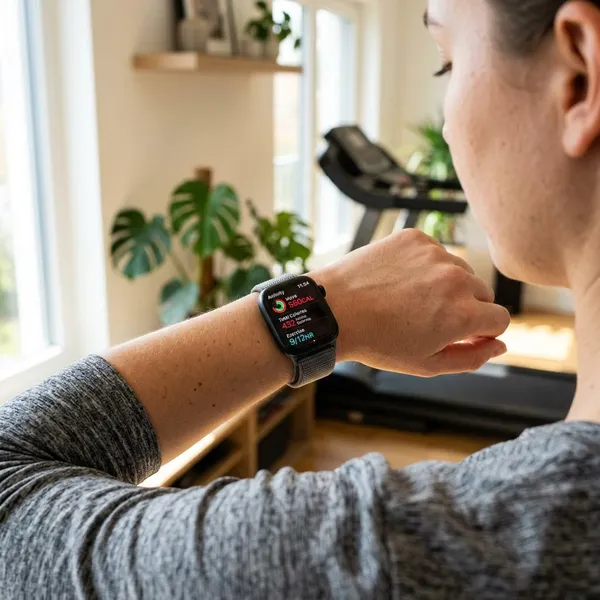
Which Apple Watch Calorie Number Should You Use?
The right calorie number depends on the decision you are trying to make. Total Calories, Active Calories, and Move calories are related, but they are useful for different jobs.
Total Calories for daily energy burn
Use Total Calories when you want an estimate of your full-day energy use. This is the most relevant Apple Watch number for thinking about maintenance calories, calorie deficits, or how workout days differ from rest days.
For weight management, treat it as a starting estimate rather than a guarantee. Pair it with your food intake and weight trend over a few weeks, then adjust based on what actually happens.
Active Calories for exercise tracking
Active Calories are better when the question is about movement or exercise effort. They remove the resting burn that would have happened anyway, so they are cleaner for comparing workouts.
- Compare a run with a bike ride.
- Check whether a workout was harder than usual.
- Track extra movement on busy days.
Move calories for Move Ring progress
Move calories are mainly for your Move Ring goal. They are useful if your priority is building a daily activity habit, closing rings, or staying accountable to a movement target.
They are not the best number for estimating your full calorie budget because they do not represent your whole-day burn. Think of Move calories as a behavior goal, not your total energy use.

Conclusion
Total Calories are most useful when you want the broadest view of your day, while Active Calories and Move calories are better for exercise and habit tracking. If the number looks strange, check your Health details, watch fit, workout choice, and whether you are comparing the same type of calorie data. Once you separate those numbers, Apple Watch becomes much easier to use without overreacting to every daily change.