How Do Apple Watch Active and Total Calories Differ?
If your Apple Watch shows two calorie numbers, the quick answer is this: active calories are the calories you burn by moving, while total calories include those active calories plus the calories your body burns at rest. The two numbers are supposed to be different, and total calories will almost always be higher. For most daily decisions, use active calories for your Move ring and total calories when you want a fuller view of your day’s energy burn.
What active calories mean on Apple Watch
Active calories are Apple’s estimate of the extra energy you burn through movement. They do not include the calories your body would have burned anyway while resting, sitting, or sleeping.
Active calories come from movement and exercise
Any movement that raises your energy use above rest can add active calories. A workout counts, but so can a brisk walk, carrying groceries, cleaning the house, walking around at work, or climbing stairs.
- Formal exercise: running, cycling, strength training, swimming, or a recorded workout.
- Everyday movement: errands, chores, walking the dog, or taking the stairs.
- Busy-on-your-feet days: retail shifts, childcare, yard work, or travel days with lots of walking.
The Move ring is based on active calories
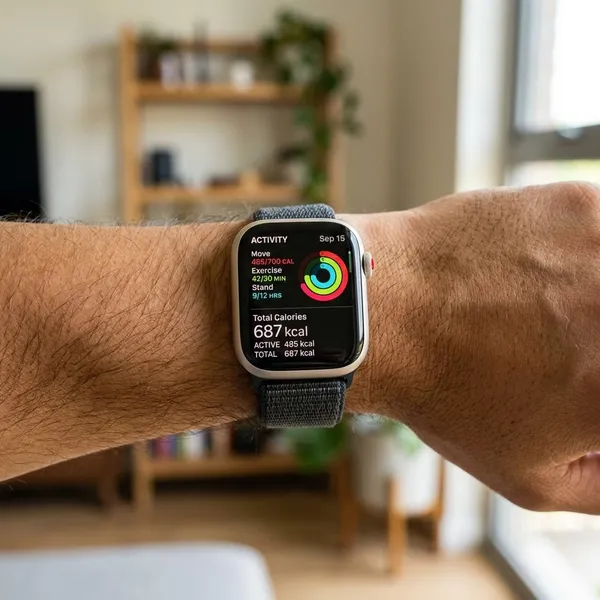
The red Move ring uses active calories. If your Move goal is 500 calories, you close it by burning 500 active calories, not by reaching 500 total calories.
What total calories mean on Apple Watch
Total calories give a wider view of your energy burn. They include movement, exercise, and the baseline calories your body uses even when you are doing nothing active.
Total calories include active calories
Active calories are part of total calories. They are not a separate number that should be added again later.
- Active calories: energy burned through movement above rest.
- Resting calories: energy used for basic body functions.
- Total calories: active calories plus resting calories.
For example, if your day shows 480 active calories and 1,900 total calories, that usually means about 1,420 calories came from resting burn. It does not mean Apple counted your workout twice.
Total calories also include calories burned at rest
Resting calories cover the energy your body uses to keep basic systems running: breathing, circulation, body temperature, brain activity, digestion, and normal organ function. You burn these calories during a workout, during a meeting, and while asleep.
What the difference is between active and total calories
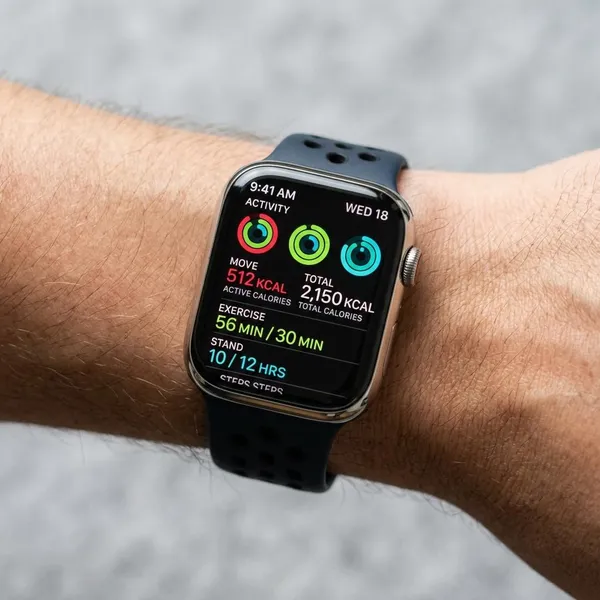
The difference is not a glitch; it is the difference between activity burn and all-day burn. Active calories answer, “How much did I burn by moving?” Total calories answer, “How much energy did my body use overall?”
Active calories track what you burn by moving
Active calories are the better number when you want to judge your movement habits. If you take a 25-minute walk after dinner, log a workout, or spend Saturday doing yard work, this number should respond more clearly than total calories.
Total calories combine movement and resting burn
Total calories are more useful when you want the full daily estimate. They combine the energy from your activity with the energy your body was already using in the background.
A rest day shows the difference clearly. Your active calories may be low because you skipped your workout, but your total calories will not drop to zero because your resting burn continues all day.
The gap between both numbers is completely normal
A large gap is expected. For many people, resting calories make up a big share of daily energy burn, especially on quiet days.
- Sedentary day: low active calories, but total calories still climb through resting burn.
- Workout day: active calories rise, and total calories rise with them.
- Long walking day: the gap may feel smaller because movement adds up steadily.

Where you can find both numbers
Apple makes active calories easy to see, but total calories are usually tucked into more detailed screens. If you are comparing the two, check the context carefully: a workout summary and a full-day activity summary are not always showing the same time period.
Active calories are easy to spot in the Move ring
The fastest place to find active calories is the red Move ring on your Apple Watch or in the Fitness app. That number shows your progress toward the Move goal you set.
- Open the Activity view on Apple Watch.
- Look at the red Move ring.
- Check the calorie number tied to that ring.
Total calories appear in workout and activity details
Total calories often appear in workout summaries or deeper activity details. During a workout, Apple may show both active calories and total calories for that session, with total calories slightly higher because resting burn continues during the workout time.
The Fitness app gives a clearer daily overview
The Fitness app on iPhone is usually easier for comparing daily numbers because the screen gives more context. It helps you see your Move progress, workout results, and patterns across different days.
Which number matters more for your goal
The better number depends on the decision you are making. Active calories are best for movement goals. Total calories are better for understanding overall daily burn. For weight loss, neither number should be used alone without context.
Active calories are more useful for Move goals
If your goal is to close your rings, active calories are the number that matters. They are also the more practical number when you want a simple nudge to move more today.
Total calories are more useful for full daily burn
Total calories matter more when you are trying to understand your overall energy use. They give a broader estimate than the Move ring because they include both movement and resting burn.
- Use active calories to decide whether you moved enough today.
- Use total calories to estimate your full daily burn.
- Use trends when comparing days, not one isolated reading.
This is especially helpful if you plan meals around activity. A 400-calorie Move day does not mean your body only used 400 calories; it means 400 calories came from movement above rest.
Weight loss tracking often needs both numbers in context
For weight loss, total calories are usually the more relevant estimate because body weight changes depend on overall energy balance over time. Active calories still matter because they show whether your movement routine is becoming more consistent.
The safer way to use Apple Watch data is to compare weekly averages. If your food intake, total calorie estimate, body weight trend, and activity level all point in the same direction, the data is more useful. If you focus on one high-calorie workout and eat back every estimated calorie, you may be putting too much trust in a number that is still only an estimate.
What can affect calorie accuracy
Apple Watch calorie numbers are estimates, not lab measurements. They are still useful, especially for trends, but accuracy depends on the information the watch has and how well it can read your movement.
Personal data helps Apple Watch estimate calories
Your age, sex, height, weight, and heart rate data all affect calorie estimates. If your weight has changed or your Health profile is outdated, update it before worrying too much about the calorie numbers.
This is the first thing to check if your readings seem off. Two people doing the same walk can see different calorie estimates because their bodies, heart rates, and personal details are different.
Workouts and calibration improve measurement accuracy
Recording the right workout type gives Apple Watch better context than relying on automatic detection. A snug fit also matters because poor heart rate readings can weaken the estimate.
- Wear it snugly: the sensor should stay in contact without feeling painful.
- Choose the workout type: walking, running, cycling, strength, or the closest match.
- Use outdoor walks or runs when possible: GPS can help with pace and distance calibration.
- Be cautious with hard-to-measure activities: stroller walks, weight training, and cycling with steady wrists may be less precise.

Conclusion
Active calories are the number to watch when you want to move more and close your Move ring; total calories are the number to check when you want a broader estimate of your daily burn. The smartest approach is to treat both as useful estimates, not exact proof. If you keep your personal data updated, record workouts properly, and compare trends over time, the numbers become much easier to use without overthinking every calorie.